<?xml version="1.0" encoding="utf-8"?><feed xmlns="http://www.w3.org/2005/Atom" ><generator uri="https://jekyllrb.com/" version="3.10.0">Jekyll</generator><link href="https://atdr.uk/feed.xml" rel="self" type="application/atom+xml" /><link href="https://atdr.uk/" rel="alternate" type="text/html" /><updated>2026-07-18T18:17:48+00:00</updated><id>https://atdr.uk/feed.xml</id><title type="html">Andreas Richardson</title><entry><title type="html">Remote SSH for Raspberry Pi with Cloudflare Tunnel</title><link href="https://atdr.uk/remote-ssh-raspberry-pi-cloudflare-tunnel/" rel="alternate" type="text/html" title="Remote SSH for Raspberry Pi with Cloudflare Tunnel" /><published>2026-07-10T12:00:00+00:00</published><updated>2026-07-10T12:00:00+00:00</updated><id>https://atdr.uk/remote-ssh-raspberry-pi-cloudflare-tunnel</id><content type="html" xml:base="https://atdr.uk/remote-ssh-raspberry-pi-cloudflare-tunnel/"><![CDATA[<p>Getting SSH access to a Raspberry Pi from outside my home network used to mean either port-forwarding on my router (inviting brute-force attempts on port 22) or running a VPN with its own infrastructure. Cloudflare Tunnel is cleaner: the Pi dials out to Cloudflare’s network rather than listening for inbound connections, so there are no open ports at all.</p>

<p>Pairing the tunnel with <a href="https://developers.cloudflare.com/cloudflare-one/access-controls/">Cloudflare Access</a> gates the SSH endpoint behind an identity layer: only authenticated users with the right policy can reach it. This guide covers the tunnel setup on the Pi, the Access application with identity provider and MFA, and the SSH client config to connect through it.</p>

<p><em>Validated end to end in July 2026 with <code class="language-plaintext highlighter-rouge">cloudflared</code> 2026.7.1 on a Pi running Debian 13 (trixie).</em></p>

<h2 id="prerequisites">Prerequisites</h2>

<ul>
  <li>Raspberry Pi with SSH enabled and a working internet connection</li>
  <li><a href="https://dash.cloudflare.com/sign-up">Cloudflare account</a> with <a href="https://developers.cloudflare.com/fundamentals/manage-domains/add-site/">domain managed by Cloudflare DNS</a></li>
  <li><a href="https://developers.cloudflare.com/cloudflare-one/setup/#2-create-a-zero-trust-organization">Cloudflare Zero Trust organisation</a> (the free tier covers this use case)</li>
</ul>

<h2 id="step-1-install-cloudflared-on-the-raspberry-pi">Step 1: Install <a href="https://github.com/cloudflare/cloudflared"><code class="language-plaintext highlighter-rouge">cloudflared</code></a> on the Raspberry Pi</h2>

<p><a href="https://github.com/cloudflare/cloudflared#installing-cloudflared">Install the <code class="language-plaintext highlighter-rouge">cloudflared</code> daemon</a>, via the <a href="https://pkg.cloudflare.com/index.html">Cloudflare Package Repository</a>.</p>

<div class="language-bash highlighter-rouge"><div class="highlight"><pre class="highlight"><code><span class="c"># add cloudflare gpg key</span>
<span class="nb">sudo mkdir</span> <span class="nt">-p</span> <span class="nt">--mode</span><span class="o">=</span>0755 /usr/share/keyrings
curl <span class="nt">-fsSL</span> https://pkg.cloudflare.com/cloudflare-main.gpg | <span class="nb">sudo tee</span> /usr/share/keyrings/cloudflare-main.gpg <span class="o">&gt;</span>/dev/null

<span class="c"># add the stable build for Debian to your apt repositories</span>
<span class="nb">echo</span> <span class="s1">'deb [signed-by=/usr/share/keyrings/cloudflare-main.gpg] https://pkg.cloudflare.com/cloudflared any main'</span> | <span class="nb">sudo tee</span> /etc/apt/sources.list.d/cloudflared.list

<span class="c"># install cloudflared</span>
<span class="nb">sudo </span>apt-get update <span class="o">&amp;&amp;</span> <span class="nb">sudo </span>apt-get <span class="nb">install </span>cloudflared

<span class="c"># check installed version</span>
cloudflared <span class="nt">--version</span>
</code></pre></div></div>

<p>Then authenticate:</p>

<div class="language-bash highlighter-rouge"><div class="highlight"><pre class="highlight"><code>cloudflared tunnel login
</code></pre></div></div>

<p>On a desktop this opens a browser window; on a headless Pi it prints a URL to open on any other device. Log in, select the zone to add the tunnel to, and click <strong>Authorize</strong>; <code class="language-plaintext highlighter-rouge">cloudflared</code> then writes a <code class="language-plaintext highlighter-rouge">cert.pem</code> credential to <code class="language-plaintext highlighter-rouge">~/.cloudflared/</code>.</p>

<h2 id="step-2-create-the-tunnel">Step 2: Create the tunnel</h2>

<div class="language-bash highlighter-rouge"><div class="highlight"><pre class="highlight"><code>cloudflared tunnel create raspberrypi
cloudflared tunnel info raspberrypi
</code></pre></div></div>

<p><a href="https://developers.cloudflare.com/cloudflare-one/networks/connectors/cloudflare-tunnel/get-started/create-remote-tunnel/"><code class="language-plaintext highlighter-rouge">tunnel create</code></a> registers a named tunnel with Cloudflare and writes a credentials JSON to <code class="language-plaintext highlighter-rouge">~/.cloudflared/&lt;Tunnel-UUID&gt;.json</code>. Keep that UUID to hand; you’ll need it in the config file.<sup id="fnref:1" role="doc-noteref"><a href="#fn:1" class="footnote" rel="footnote">1</a></sup></p>

<h2 id="step-3-set-up-cloudflare-access">Step 3: Set up <a href="https://www.cloudflare.com/sase/products/access/">Cloudflare Access</a></h2>

<p>Cloudflare recommends creating the Access application <em>before</em> routing DNS to the tunnel, so the endpoint is protected from the moment it becomes reachable. (The Zero Trust dashboard is now branded <strong>Cloudflare One</strong>; the section names below have been stable, but expect the navigation to drift.)</p>

<h3 id="add-identity-providers">Add <a href="https://developers.cloudflare.com/cloudflare-one/integrations/identity-providers/">identity providers</a></h3>

<p>From the <a href="https://dash.cloudflare.com">Cloudflare dashboard</a> go to <strong>Zero Trust (Cloudflare One) → Integrations → Identity providers → Add new identity provider</strong> to configure how users authenticate. A few options I’ve found useful:</p>

<ul>
  <li><strong><a href="https://developers.cloudflare.com/cloudflare-one/integrations/identity-providers/one-time-pin/">One-time PIN</a></strong>: the default option, where users receive a code by email.</li>
  <li><strong><a href="https://developers.cloudflare.com/cloudflare-one/integrations/identity-providers/cloudflare/">Cloudflare</a></strong>: authenticates users via their Cloudflare account. Optionally toggle <em>Restrict to account members</em> to limit access to people in your Cloudflare organisation.</li>
  <li><strong><a href="https://developers.cloudflare.com/cloudflare-one/integrations/identity-providers/github/">GitHub</a></strong>: requires a GitHub OAuth app first. Go to <strong>GitHub Settings → Developer Settings → <a href="https://github.com/settings/developers">OAuth Apps</a> → New OAuth app</strong>, set the homepage URL to <code class="language-plaintext highlighter-rouge">https://&lt;your-team-name&gt;.cloudflareaccess.com</code> and the authorisation callback URL to <code class="language-plaintext highlighter-rouge">https://&lt;your-team-name&gt;.cloudflareaccess.com/cdn-cgi/access/callback</code>, then copy the Client ID and Client Secret into the Zero Trust GitHub IdP form.</li>
</ul>

<h3 id="add-independent-mfa-optional">Add <a href="https://developers.cloudflare.com/cloudflare-one/access-controls/policies/mfa-requirements/#independent-mfa">independent MFA</a> (optional)</h3>

<p>For an extra layer on top of the IdP, go to <strong>Zero Trust → Access controls → Access settings → Allow multi-factor authentication (MFA)</strong> and enable MFA methods (e.g., <strong>Biometrics</strong> to use Passkeys), then tick <strong>Apply global MFA settings by default</strong> to enable MFA on all Applications and Policies.</p>

<h3 id="create-the-access-application">Create the <a href="https://developers.cloudflare.com/cloudflare-one/access-controls/applications/http-apps/self-hosted-public-app/">Access application</a></h3>

<p>Go to <strong>Zero Trust → Access controls → Applications → Create new application → Self-hosted and private</strong>.</p>

<ul>
  <li>Add a <strong>Destination</strong> for the SSH hostname (e.g. <code class="language-plaintext highlighter-rouge">raspberrypi-ssh.yourdomain.com</code>) and a second for the test hostname used in the tunnel config below (e.g. <code class="language-plaintext highlighter-rouge">raspberrypi-test.yourdomain.com</code>). Anything the tunnel exposes without an Access destination is reachable by the whole internet; an application supports up to five.<br />
<strong>Pro Tip:</strong> You can only have <a href="https://developers.cloudflare.com/cloudflare-one/networks/connectors/cloudflare-tunnel/troubleshoot-tunnels/common-errors/#i-see-this-site-cant-provide-a-secure-connection">1 level of subdomain for free</a>.</li>
  <li>
    <p>Add an <a href="https://developers.cloudflare.com/cloudflare-one/access-controls/policies/"><strong>Access policy</strong></a> with the inline builder, e.g. scoped to the emails that should have access (the selector is called <em>Emails</em>, plural):</p>

    <table>
      <thead>
        <tr>
          <th>Action</th>
          <th>Rule type</th>
          <th>Selector</th>
          <th>Value</th>
        </tr>
      </thead>
      <tbody>
        <tr>
          <td>Allow</td>
          <td>Include</td>
          <td>Emails</td>
          <td><code class="language-plaintext highlighter-rouge">you@email.com</code></td>
        </tr>
      </tbody>
    </table>

    <p>Name and save the policy. The default session duration is 24 hours, so expect to re-authenticate daily unless you change it.</p>
  </li>
  <li>Copy the <strong>Application Audience (AUD) tag</strong> from the <strong>Additional settings</strong> tab; you’ll need it for the tunnel config. (The application name is auto-generated from the first destination; rename it if you like.)</li>
</ul>

<h2 id="step-4-write-the-tunnel-config">Step 4: Write the tunnel config</h2>

<p>Create <a href="https://developers.cloudflare.com/cloudflare-one/networks/connectors/cloudflare-tunnel/do-more-with-tunnels/local-management/configuration-file/"><code class="language-plaintext highlighter-rouge">~/.cloudflared/config.yml</code></a>:</p>

<div class="language-yaml highlighter-rouge"><div class="highlight"><pre class="highlight"><code><span class="na">tunnel</span><span class="pi">:</span> <span class="s">&lt;Tunnel-UUID&gt;</span>
<span class="na">credentials-file</span><span class="pi">:</span> <span class="s">/home/pi/.cloudflared/&lt;Tunnel-UUID&gt;.json</span>

<span class="na">ingress</span><span class="pi">:</span>
  <span class="c1"># SSH traffic routed to port 22 (default)</span>
  <span class="pi">-</span> <span class="na">hostname</span><span class="pi">:</span> <span class="s">raspberrypi-ssh.yourdomain.com</span>
    <span class="na">service</span><span class="pi">:</span> <span class="s">ssh://localhost:22</span>
    <span class="na">originRequest</span><span class="pi">:</span>
      <span class="c1"># Validate Cloudflare Access JWTs before forwarding to the origin.</span>
      <span class="c1"># This rejects traffic that bypasses the Access application.</span>
      <span class="na">access</span><span class="pi">:</span>
        <span class="na">required</span><span class="pi">:</span> <span class="no">true</span>
        <span class="na">teamName</span><span class="pi">:</span> <span class="s">&lt;your-team-name&gt;</span>
        <span class="na">audTag</span><span class="pi">:</span>
          <span class="pi">-</span> <span class="s">&lt;Access-application-audience-tag&gt;</span>
  <span class="c1"># test HTTP/S server to validate tunnel connection</span>
  <span class="pi">-</span> <span class="na">hostname</span><span class="pi">:</span> <span class="s">raspberrypi-test.yourdomain.com</span>
    <span class="na">service</span><span class="pi">:</span> <span class="s">hello_world</span>
    <span class="na">originRequest</span><span class="pi">:</span>
      <span class="na">access</span><span class="pi">:</span>
        <span class="na">required</span><span class="pi">:</span> <span class="no">true</span>
        <span class="na">teamName</span><span class="pi">:</span> <span class="s">&lt;your-team-name&gt;</span>
        <span class="na">audTag</span><span class="pi">:</span>
          <span class="pi">-</span> <span class="s">&lt;Access-application-audience-tag&gt;</span>
  <span class="c1"># catch-all 404</span>
  <span class="pi">-</span> <span class="na">service</span><span class="pi">:</span> <span class="s">http_status:404</span>
</code></pre></div></div>

<ul>
  <li>The <a href="https://developers.cloudflare.com/cloudflare-one/networks/connectors/cloudflare-tunnel/configure-tunnels/origin-parameters/#access"><code class="language-plaintext highlighter-rouge">originRequest.access</code></a> block tells <code class="language-plaintext highlighter-rouge">cloudflared</code> to validate the Cloudflare Access JWT on every inbound request before forwarding it to the origin, so even traffic that reaches the tunnel while bypassing the Access layer is rejected.</li>
  <li><strong>The <code class="language-plaintext highlighter-rouge">access</code> block must sit under each individual ingress rule.</strong> Despite what <a href="https://developers.cloudflare.com/cloudflare-one/networks/connectors/cloudflare-tunnel/do-more-with-tunnels/local-management/configuration-file/#origin-configuration">the docs</a> suggest about top-level <code class="language-plaintext highlighter-rouge">originRequest</code> settings, a top-level <code class="language-plaintext highlighter-rouge">access</code> block is silently ignored and unauthenticated traffic is forwarded anyway (verified with 2026.7.1). Full explanation in <a href="https://github.com/cloudflare/cloudflared/issues/784">cloudflared#784</a> and <a href="https://github.com/cloudflare/cloudflare-docs/issues/32006">cloudflare-docs#32006</a>.</li>
  <li><a href="https://developers.cloudflare.com/cloudflare-one/networks/connectors/cloudflare-tunnel/routing-to-tunnel/protocols/">Ingress rules</a> are matched top-to-bottom; the catch-all <code class="language-plaintext highlighter-rouge">http_status:404</code> at the end is required.</li>
</ul>

<p>Validate the config and dry-run a rule:</p>

<div class="language-bash highlighter-rouge"><div class="highlight"><pre class="highlight"><code>cloudflared tunnel ingress validate
cloudflared tunnel ingress rule ssh://raspberrypi-ssh.yourdomain.com
</code></pre></div></div>

<h2 id="step-5-route-dns">Step 5: Route DNS</h2>

<div class="language-bash highlighter-rouge"><div class="highlight"><pre class="highlight"><code>cloudflared tunnel route dns raspberrypi raspberrypi-ssh.yourdomain.com
cloudflared tunnel route dns raspberrypi raspberrypi-test.yourdomain.com
</code></pre></div></div>

<p>This automatically creates <a href="https://developers.cloudflare.com/tunnel/routing/#dns-records">CNAME records</a> in your Cloudflare DNS zone pointing at the tunnel.</p>

<h2 id="step-6-test-the-tunnel">Step 6: Test the tunnel</h2>

<p>Before installing anything as a service, run the tunnel in the foreground:</p>

<div class="language-bash highlighter-rouge"><div class="highlight"><pre class="highlight"><code>cloudflared tunnel run raspberrypi
</code></pre></div></div>

<p>Within a few seconds the log should show several <code class="language-plaintext highlighter-rouge">Registered tunnel connection</code> lines. Then visit <code class="language-plaintext highlighter-rouge">https://raspberrypi-test.yourdomain.com</code> in a browser: after the Access login you should see the built-in hello world page (“Congrats! You created a tunnel!”) served from the Pi.</p>

<p>If the test behaves oddly in the first minute: a bare <code class="language-plaintext highlighter-rouge">403</code> means the Access application hasn’t propagated to the edge yet and the per-rule <code class="language-plaintext highlighter-rouge">access</code> block is rejecting the request itself (defence-in-depth doing its job); a <code class="language-plaintext highlighter-rouge">404</code> means the hostname fell through to the catch-all rule, so check the hostnames in <code class="language-plaintext highlighter-rouge">config.yml</code> match the DNS routes.</p>

<p>Stop the foreground tunnel with <code class="language-plaintext highlighter-rouge">Ctrl+C</code> before the next step.</p>

<h2 id="step-7-install-as-a-system-service">Step 7: Install as a system service</h2>

<div class="language-bash highlighter-rouge"><div class="highlight"><pre class="highlight"><code><span class="nb">sudo </span>cloudflared <span class="nt">--config</span> ~/.cloudflared/config.yml service <span class="nb">install</span>
</code></pre></div></div>

<p>This copies the config to <code class="language-plaintext highlighter-rouge">/etc/cloudflared/config.yml</code> and enables <em>and</em> starts a systemd service, so no separate <code class="language-plaintext highlighter-rouge">systemctl enable</code>/<code class="language-plaintext highlighter-rouge">start</code> is needed. Check it with:</p>

<div class="language-bash highlighter-rouge"><div class="highlight"><pre class="highlight"><code>systemctl status cloudflared
</code></pre></div></div>

<p>The explicit <code class="language-plaintext highlighter-rouge">--config</code> matters: under <code class="language-plaintext highlighter-rouge">sudo</code>, <code class="language-plaintext highlighter-rouge">cloudflared</code> searches root’s config locations and won’t find files in your home directory. (The shell expands <code class="language-plaintext highlighter-rouge">~</code> before <code class="language-plaintext highlighter-rouge">sudo</code> runs, so the command above passes the right path.)</p>

<p>The credentials JSON stays in <code class="language-plaintext highlighter-rouge">/home/pi/.cloudflared/</code>; future config edits go in <code class="language-plaintext highlighter-rouge">/etc/cloudflared/config.yml</code>, followed by:</p>

<div class="language-bash highlighter-rouge"><div class="highlight"><pre class="highlight"><code><span class="nb">sudo </span>systemctl restart cloudflared
</code></pre></div></div>

<h2 id="step-8-connect-from-your-client">Step 8: Connect from your client</h2>

<p><a href="https://github.com/cloudflare/cloudflared#installing-cloudflared">Install <code class="language-plaintext highlighter-rouge">cloudflared</code></a> on the machine you’re connecting from (Mac: <code class="language-plaintext highlighter-rouge">brew install cloudflared</code>), then <a href="https://developers.cloudflare.com/cloudflare-one/networks/connectors/cloudflare-tunnel/use-cases/ssh/ssh-cloudflared-authentication/">configure <code class="language-plaintext highlighter-rouge">cloudflared</code> as proxy</a> in <code class="language-plaintext highlighter-rouge">~/.ssh/config</code>:</p>

<div class="language-plaintext highlighter-rouge"><div class="highlight"><pre class="highlight"><code>Host raspberrypi-ssh.yourdomain.com
  ProxyCommand cloudflared access ssh --hostname %h
</code></pre></div></div>

<p>(<code class="language-plaintext highlighter-rouge">cloudflared access ssh-config --hostname raspberrypi-ssh.yourdomain.com</code> prints exactly this block, with the absolute path to the binary filled in.)</p>

<p>Then connect as normal:</p>

<div class="language-bash highlighter-rouge"><div class="highlight"><pre class="highlight"><code>ssh pi@raspberrypi-ssh.yourdomain.com
</code></pre></div></div>

<p>The first connection opens a browser window for Cloudflare Access authentication (and SSH prompts you to accept the Pi’s host key as usual); once authenticated, the session completes in the terminal. Subsequent connections within the Access session duration are seamless.</p>

<p><strong>Pro Tip:</strong> if <code class="language-plaintext highlighter-rouge">cloudflared</code> isn’t on your <code class="language-plaintext highlighter-rouge">$PATH</code> when SSH runs the <code class="language-plaintext highlighter-rouge">ProxyCommand</code>, use the absolute path: run <code class="language-plaintext highlighter-rouge">which cloudflared</code> and substitute the result.</p>

<hr />

<p>The end result is a Pi that’s reachable from anywhere, with no open ports on the router, no public IP dependency, and an identity-gated access layer with MFA that starts with the Pi on every boot. (Yes, I rebooted it to check.)</p>

<div class="footnotes" role="doc-endnotes">
  <ol>
    <li id="fn:1" role="doc-endnote">
      <p><code class="language-plaintext highlighter-rouge">cloudflared tunnel info raspberrypi</code> shows the UUID alongside any active connectors. You can also find it in the filename of the credentials JSON under <code class="language-plaintext highlighter-rouge">~/.cloudflared/</code>. <a href="#fnref:1" class="reversefootnote" role="doc-backlink">&#8617;</a></p>
    </li>
  </ol>
</div>]]></content><author><name>andreasrichardson</name></author><category term="blog" /><category term="raspberry-pi" /><category term="cloudflare" /><category term="ssh" /><category term="security" /><summary type="html"><![CDATA[How to expose your Raspberry Pi's SSH over the internet securely using Cloudflare Tunnel and Cloudflare Access, with no open ports.]]></summary></entry><entry><title type="html">London culture deals for students and young people</title><link href="https://atdr.uk/london-culture-deals/" rel="alternate" type="text/html" title="London culture deals for students and young people" /><published>2019-09-23T12:13:00+00:00</published><updated>2019-09-23T12:13:00+00:00</updated><id>https://atdr.uk/london-culture-deals</id><content type="html" xml:base="https://atdr.uk/london-culture-deals/"><![CDATA[<p>Over the past 2 years, I’ve tried to go to lots of cultural events in London—and of course, deals for students make it easier! As I head off on my exchange year in Switzerland, here’s a summary of what I’ve discovered so far…</p>

<h2 id="theatre">Theatre</h2>

<ul>
  <li>National Theatre: <a href="https://www.nationaltheatre.org.uk/entry-pass">Entry Pass</a></li>
</ul>

<h3 id="west-end">West End</h3>

<ul>
  <li><a href="https://www.mousetrap.org.uk/index.php/young-people/westend4-p10-19-23-year-olds.html">WestEnd4£10</a></li>
  <li>Royal Shakespeare Company: <a href="https://www.rsc.org.uk/rsc-key">RSC Key</a></li>
  <li>Donmar Warehouse: <a href="https://www.donmarwarehouse.com/visit/young-free/">YOUNG+FREE</a></li>
  <li>Theatre Royal Haymarket: <a href="http://masterclass.org.uk">Masterclass</a></li>
</ul>

<h3 id="others">Others</h3>

<ul>
  <li>Bridge Theatre: <a href="https://bridgetheatre.co.uk/membership/">Young Bridge</a> / <a href="https://bridgetheatre.co.uk/bridge7-50/">Bridge7.50</a></li>
  <li>Young Vic: <a href="https://www.youngvic.org/visit-us/concessions">25 and Under / Students</a></li>
  <li>Old Vic: <a href="https://www.oldvictheatre.com/your-visit/booking-tickets/pwc">£10 Previews</a></li>
  <li>Regent’s Park Open Air Theatre: <a href="https://openairtheatre.com/breeze">Breeze</a></li>
  <li>Almeida Theatre: <a href="https://almeida.co.uk/concessions">£15 tix</a></li>
  <li>Royal Court: <a href="https://royalcourttheatre.com/support-us/join/?Name=YoungCourt">Young Court Friends</a></li>
  <li>Hampstead Theatre: <a href="https://www.hampsteadtheatre.com/about-us/the-downstairs-club/">Downstairs Club</a> / <a href="https://www.hampsteadtheatre.com/your-visit/under-30s/">Under 30s</a></li>
  <li>Bush Theatre: <a href="https://www.bushtheatre.co.uk/your-visit/ways-to-save/bush-connect/">Bush Connect</a></li>
</ul>

<h2 id="opera">Opera</h2>

<ul>
  <li>Royal Opera House: <a href="http://www.roh.org.uk/for/rohstudents">Young ROH</a></li>
  <li>English National Opera: <a href="https://www.eno.org/your-visit/ways-to-save-offers/access-all-arias/">Access All Arias</a></li>
  <li>Opera Holland Park: <a href="https://operahollandpark.com/season-and-events/ticket-schemes/under-30s-scheme/">Under 30s</a></li>
</ul>

<h2 id="music">Music</h2>

<ul>
  <li>Roundhouse: <a href="https://www.roundhouse.org.uk/young-creatives/get-in/">Get In</a></li>
  <li><a href="https://studentpulselondon.co.uk">Student Pulse</a></li>
</ul>

<h2 id="cinema">Cinema</h2>

<ul>
  <li>BFI Southbank: <a href="https://www.bfi.org.uk/25-and-under">25 &amp; Under</a></li>
</ul>

<h2 id="other">Other</h2>

<ul>
  <li><a href="https://www.studentartpass.org">Student Art Pass</a></li>
  <li>Tate: <a href="https://www.tate.org.uk/tate-collective">Tate Collective</a></li>
  <li>Barbican Centre: <a href="https://www.barbican.org.uk/join-support/young-barbican">Young Barbican</a></li>
</ul>]]></content><author><name>andreasrichardson</name></author><category term="blog" /><summary type="html"><![CDATA[All the best offers on Theatre, Music, Art, Opera and more]]></summary></entry><entry><title type="html">Engineering a better, sustainable world</title><link href="https://atdr.uk/engineering-a-better-sustainable-world/" rel="alternate" type="text/html" title="Engineering a better, sustainable world" /><published>2019-01-24T20:05:00+00:00</published><updated>2019-01-24T20:05:00+00:00</updated><id>https://atdr.uk/engineering-a-better-sustainable-world</id><content type="html" xml:base="https://atdr.uk/engineering-a-better-sustainable-world/"><![CDATA[<p>I went along to hear <a href="https://www.raeng.org.uk/policy/partnerships/international-policy-and-development/gcrf-international-development/engineering-a-better-world-caets-2016/conference-theme/speakers/dr-marlene-kanga">Dr Marlene Kanga</a> speak on ‘<a href="http://www3.imperial.ac.uk/newsandeventspggrp/imperialcollege/engineering/chemicalengineering/eventssummary/event_8-1-2019-16-24-47">Engineering a Better, Sustainable World: Advancing the UN 2030 agenda with diverse teams</a>‘—and decided on a whim to take some notes.</p>

<p><img src="/assets/images/marlene-kanga-engineering-a-better-sustainable-world.png" alt="" /></p>

<p>There’s also <a href="/assets/files/marlene-kanga-engineering-a-better-sustainable-world.pdf">an accessible PDF</a> (using handwriting recognition).</p>]]></content><author><name>andreasrichardson</name></author><category term="blog" /><summary type="html"><![CDATA[Dr Marlene Kanga—turned into a infographic]]></summary><media:thumbnail xmlns:media="http://search.yahoo.com/mrss/" url="https://atdr.uk/assets/images/marlene-kanga-title.png" /><media:content medium="image" url="https://atdr.uk/assets/images/marlene-kanga-title.png" xmlns:media="http://search.yahoo.com/mrss/" /></entry><entry><title type="html">Adventures in Asia: summer school at Tsinghua</title><link href="https://atdr.uk/tsinghua-summer-school/" rel="alternate" type="text/html" title="Adventures in Asia: summer school at Tsinghua" /><published>2018-09-12T16:42:00+00:00</published><updated>2018-09-12T16:42:00+00:00</updated><id>https://atdr.uk/tsinghua-summer-school</id><content type="html" xml:base="https://atdr.uk/tsinghua-summer-school/"><![CDATA[<p>Descending into the smog over Beijing one morning in early August, I wasn’t entirely sure what to expect of the <a href="http://goglobal.tsinghua.edu.cn/en/program/envsummer2018">Tsinghua Summer School in Environment</a>. As I left two weeks later though, I was aware of how much I’d enjoyed the experience of coming together with nearly 120 other students from across the world to try and tackle the environmental challenges facing China and the wider world.</p>

<p>Getting from the airport to the campus was a rude awakening that my extremely basic Mandarin (<em>nĭ hăo</em>) wasn’t going to get me very far in China. Robert Burns wasn’t wrong when he wrote about the best-laid plans going awry—that’s exactly what had happened with my grand ideas to learn Mandarin before departing.</p>

<p>Once on campus, and after a few magical mystery tours to buy basic necessities and get internet access working—no, family and friends, I hadn’t fallen off the face of the earth, I just didn’t have WiFi yet—it was time to meet the rest of my group. Over mung bean smoothies (think mushy peas, but cold) we introduced ourselves and got to know each other and our teaching assistant.</p>

<p>Before long we had our first challenge, and it was a bombshell—we were expected to put on a group performance at the opening ceremony. After much deliberation, a consensus was reached that about the only thing we could manage would be a song, and the choice of Justin Bieber’s <em>Baby</em> was made. Apparently that’s the closest thing to a culturally universal song out there.</p>

<p>After the mild trauma of the opening ceremony the next day, it was time to settle into the summer school proper. A mixed schedule of lectures, field trips and cultural experiences would keep us busy for our two weeks at Tsinghua, with a group project at the end to bring things to a close.</p>

<p>The diversity of speakers reflected that of the students, with their lectures covering scientific and policy-based approaches to tackling environmental issues. These included membrane reactors for water treatment, operating international conventions through the UN, ‘blue-green solutions’ for city resilience and financing models to support environmental action worldwide.</p>

<p>Life at Tsinghua is very different to Imperial. For one thing, the campus is huge—it’s no surprise bikes are the most popular way to get around. Most students live in dormitories and eat at the many cafeterias dotted around the campus. With all the food labelled in Chinese, dinner roulette became a daily pastime. It was all tasty though, and undeniably cheap.</p>

<p>Seeing the sights around Beijing during field trips and free time was a particular highlight. Our brilliant teaching assistant was really keen to show us around, and we had some great times together, wandering through an ancient <em>hutong</em> before dining at a tiny Szechuan restaurant, stumbling across a karaoke night in Wudaokou after a group meeting, sampling traditional deserts in Wangfujing, exploring the Temple of Heaven before watching night fall over Houhai lake, joining the 80,000-strong crush of people visiting the Forbidden City each day, getting lost in the Summer Palace and having to dash for the last ferry across the lake, and soaking up the atmosphere of the Olympic Park by night.</p>

<p>One of the most valuable aspects of the experience for me was the wonderful people I met. There’s nothing quite like the bond you form when working on a group assignment together at 3 am, slightly delirious from exhaustion, or indeed from the bike ride back across campus at 4. We shared loads of great experiences with students from across the world, and it was fascinating to learn about the culture and environmental challenges of peoples’ countries. It’s not often you’ll find a group of young people getting deep into conversation about the solid waste management systems in their homelands. Perhaps unsurprisingly, that’s the topic we ended up picking for our group project.</p>

<p>I’m sure there’s never been a more important time for chemical engineers to be addressing environmental challenges. The breadth of industry we can impact gives us a unique position from which to drive positive change. I left Tsinghua confident that the future is bright.</p>

<hr />

<p>This experience was supported by scholarships from Tsinghua and <a href="https://www.imperial.ac.uk/students/global-opportunities/ug/externalopp/tsinghuasummerschools/">Imperial</a>, for which I’m very grateful. This post has also been published on the <a href="https://blogs.imperial.ac.uk/chemical-engineering/2018/10/15/adventures-in-asia-summer-school-at-tsinghua/">Department of Chemical Engineering blog</a>.</p>]]></content><author><name>andreasrichardson</name></author><category term="blog" /><summary type="html"><![CDATA[I wasn't sure exactly what to expect of my fortnight in China…]]></summary><media:thumbnail xmlns:media="http://search.yahoo.com/mrss/" url="https://atdr.uk/assets/images/all-summer-school.jpg" /><media:content medium="image" url="https://atdr.uk/assets/images/all-summer-school.jpg" xmlns:media="http://search.yahoo.com/mrss/" /></entry><entry><title type="html">State of the EdTech 2018</title><link href="https://atdr.uk/state-of-the-edtech-2018/" rel="alternate" type="text/html" title="State of the EdTech 2018" /><published>2018-07-04T17:28:00+00:00</published><updated>2018-07-04T17:28:00+00:00</updated><id>https://atdr.uk/state-of-the-edtech-2018</id><content type="html" xml:base="https://atdr.uk/state-of-the-edtech-2018/"><![CDATA[<p>At the end of my first year of university, here’s a review of the tools I’ve used to learn.</p>

<h2 id="organisation">Organisation</h2>

<h3 id="blackboard"><a href="http://www.blackboard.com/">Blackboard</a></h3>

<p>This is where lecturers interact with students—from presentation slides and discussion fora to past papers and online submissions, so much happens through <em>Blackboard</em>. The <em>Updates</em> and <em>My Grades</em> views are particularly useful for keeping track of things.</p>

<h3 id="todoist"><a href="https://todoist.com/">Todoist</a></h3>

<p>I’m not exaggerating when I describe <em>Todoist</em> as “the dashboard to my life”. I put everything in this task manager, because it’s so easy to forget when you’re juggling lots of commitments. Tasks can be organised by project (I have one for each course), priority, tag, due date and with <a href="https://support.todoist.com/hc/en-us/articles/205248842-Filters">more complex queries using filters</a>. The <a href="https://todoist.com/education">education discount</a> makes it incredibly good value too!</p>

<p><strong>Pro Tip:</strong> enable <a href="https://support.todoist.com/hc/en-us/articles/115003128085">the Google Calendar integration</a> to see the day’s tasks in your calendar, then drag them out from the ‘all day’ section to make a schedule for the day.</p>

<h3 id="office-365">Office 365</h3>

<h4 id="onedrive">OneDrive</h4>

<p>All my files are stored in OneDrive, synced between my personal MacBook and university laptop. The iOS app’s integration with the system-wide document picker makes it really easy to access files on the go as well.</p>

<p>I decided at the beginning of the year that <strong>every bit of paper in a ringbinder would have a digital duplicate</strong> in <em>OneDrive</em>. I did have to spend time scanning documents (love ADFs), but it was useful in the end.</p>

<h4 id="sharepoint">SharePoint</h4>

<p>The better way of collaborating in a team—set up a <em>Team Site</em> or a <em>Group</em> to provide file storage and collaboration tools. Because it’s not in any one member’s personal <em>OneDrive</em>, it doesn’t matter if members come and go.</p>

<p><strong>Pro Tip:</strong> use the built-in document revision history to resolve any edit conflicts.</p>

<h4 id="office">Office</h4>

<p>The usual suspects. Favourite features this year include <em>PowerPoint Designer</em> (though be careful of <a href="https://youtu.be/NN8OHR1qSng">its foibles</a>) and Excel’s <em>Solver</em> for things like double-interpolation. <em>Visio</em> can manage simple P&amp;IDs (pretty important for a chemical engineer) with its built-in symbol library for both European and American standards.<sup id="fnref:1" role="doc-noteref"><a href="#fn:1" class="footnote" rel="footnote">1</a></sup></p>

<p><strong>Pro Tip:</strong> create a custom wiggly line style to represent flexible connections correctly under <a href="https://www.iso.org/standard/22651.html">ISO 14617-3:2002</a>.<sup id="fnref:2" role="doc-noteref"><a href="#fn:2" class="footnote" rel="footnote">2</a></sup></p>

<h3 id="calendar">Calendar</h3>

<p>Being in the right place at the right time is pretty useful, even in the age of <a href="https://www.panopto.com">lecture recordings</a>!</p>

<p><strong>Pro Tip:</strong> if you’re syncing timetable information from an external system, iOS will learn the meaning of event locations like <code class="language-plaintext highlighter-rouge">ACEX 250 - Lecture Theatre 1</code> over time, allowing it to alert you when it’s time to leave.</p>

<h3 id="acrobat">Acrobat</h3>

<p>For power features beyond your default PDF reader, Acrobat is the answer. It’s got more advanced markup tools, and things like digitally signing PDFs using my university-issued cryptographic identity make me especially happy.</p>

<h3 id="rescuetime"><a href="https://www.rescuetime.com/">RescueTime</a></h3>

<p>This time-tracking utility logs how I use my computers and gives me a productivity score each day. The weekly summary email provides a nice overview of how I spent my time—and there’s no hiding from the statistics! Expect to be motivated to increase your score.</p>

<h3 id="toggl"><a href="https://toggl.com">Toggl</a></h3>

<p>The time tracking continues—but with <em>Toggl</em> you log hours yourself. I’ve used it to track how long I’m spending in lectures, working on problem sheets and revising content. It’s nice to know that you’ve achieved a good week’s work when you get home on Friday evening.</p>

<h2 id="learning">Learning</h2>

<h3 id="studies"><a href="http://www.studiesapp.com">Studies</a></h3>

<p>Having reached the <a href="http://atdr.uk/2017/08/open-sourcing-my-revision-notes/">limits of what <em>Quizlet</em> (below) could manage last year</a>, <em>Studies</em> has proven to be more than capable of doing everything I wanted. Notes don’t just have 2 sides—now they can have <strong>unlimited</strong> <em>facets</em>. The choice of algorithms provided by the built-in study scheduler is also pretty clever.</p>

<p><strong>Pro Tip:</strong> get the free iOS app and sync your notes for offline access—now you need never be bored on the Tube again!</p>

<h3 id="quizlet"><a href="https://quizlet.com/">Quizlet</a></h3>

<p>For simple notes, Quizlet is still great. I’ve used it in particular for foreign language vocabulary, since its fuzzy matching can cope with acceptable similar answers—such as the interchangeable use of “le / un” in French.</p>

<h3 id="desmos"><a href="https://www.desmos.com">Desmos</a></h3>

<p>For graphing functions and playing around with variables, <em>Desmos</em> is great. Whether it’s <a href="https://www.desmos.com/calculator/a8gwdrpawc">wavefunctions</a> or <a href="http://atdr.eu/initialfourier">Fourier series</a>, adjusting and animating variables using its sliders is a fun way to make complex functions easy to understand.</p>

<h3 id="wolframalpha"><a href="http://www.wolframalpha.com">WolframAlpha</a></h3>

<p>A “computational knowledge engine”. Useful.</p>

<p>It’s particularly good at obscure unit conversions (just give me SI, please!), computing nasty limits and integrals and plotting functions that Desmos can’t handle. There are some <a href="http://www.wolframalpha.com/input/?i=American+flag+lamina">fun bits</a> too!</p>

<h3 id="molview"><a href="http://molview.org">MolView</a></h3>

<p>Ever wondered just what that <a href="https://twitter.com/notforfooduse/status/874935359477514240">medicine looks like</a>? <em>MolView</em> allows you to explore molecules in 3D, play with structure and view spectroscopy data—or you can just put some atoms and bonds on the page and see what you get. Particularly useful for organic chemistry.</p>

<h3 id="wordreference"><a href="http://www.wordreference.com">WordReference</a></h3>

<p>A neat bilingual dictionary, available for loads of languages.</p>

<p><strong>Pro Tip:</strong> the verb conjugator (available for some languages) is great for things like irregular subjunctives in French.</p>

<h2 id="research">Research</h2>

<h3 id="mendeley"><a href="https://www.mendeley.com">Mendeley</a></h3>

<p>A useful reference manager, with PDF storage and annotation. Save journal articles to your library and use the iOS app to read, highlight and comment on the go. Another great app for long tube journeys, though the Mac version is desperately in need of a facelift.</p>

<p><strong>Pro Tip:</strong> use the <a href="https://blog.mendeley.com/2011/10/25/howto-use-mendeley-to-create-citations-using-latex-and-bibtex/"><em>BibTeX</em> export</a> to reference with ease when writing <em>LaTeX</em> documents.</p>

<h3 id="sharelatex"><a href="https://www.sharelatex.com">ShareLaTeX</a></h3>

<p>For an easy way into <em>LaTeX</em> it’s hard to beat <em>ShareLaTeX</em>,<sup id="fnref:3" role="doc-noteref"><a href="#fn:3" class="footnote" rel="footnote">3</a></sup> which is web-based so requires no installation. The <a href="https://www.sharelatex.com/learn/">knowledge base</a> also contains loads of guidance for new users.</p>

<p><strong>Pro Tip:</strong> <a href="https://www.sharelatex.com/blog/2015/02/10/shareLaTeX-github-sync.html">sync your documents to <em>GitHub</em></a> for full version control.</p>

<h2 id="more-to-explore">More to explore</h2>

<h3 id="matlab"><a href="https://uk.mathworks.com/products/matlab.html">MATLAB</a></h3>

<p>MATrix LABoratory. Not only can it handle lots and lots of matrices very well, but it also does things like machine learning! It’s brilliant for manipulating large datasets much more easily than with <em>Excel</em>, plus the ability to make perfectly-consistent and infinitely-customisable graphs is really handy.</p>

<p><strong>Pro Tip:</strong> learn how to use <a href="https://uk.mathworks.com/help/matlab/ref/print.html">the <code class="language-plaintext highlighter-rouge">print</code> command</a> to generate PDFs of your graphs automagically.</p>

<h3 id="chemdraw"><a href="http://www.perkinelmer.co.uk/product/chemdraw-professional-chemdrawpro">ChemDraw</a></h3>

<p>I’ve only scratched the surface of what this chemical drawing package can achieve, but it’s made me some very pretty 2D structure diagrams. Its tools for converting between name and structure are pretty helpful too.</p>

<h3 id="hazel"><a href="https://www.noodlesoft.com">Hazel</a></h3>

<p>I’ve been experimenting with automating my document filing process within <em>OneDrive</em> using this handy utility. I haven’t had time to explore everything it can do, but I’m keen to learn more about how to make the most of it.</p>

<h2 id="future">Future</h2>

<p>The big plan for next year is to become <strong>paperless</strong>-–at least for lecture notes—using one of the budget-friendly <a href="https://nr.apple.com/dE4x1p2G0v">new iPads</a> with an Apple Pencil. This should reduce the amount of scanning I have to do, and make the content of the notes even more accessible to search (there’s only so much you can do with OCR…). Problem sheets will probably stay paper-based though.</p>

<div class="footnotes" role="doc-endnotes">
  <ol>
    <li id="fn:1" role="doc-endnote">
      <p><a href="https://www.autodesk.com/products/autocad/included-toolsets/autocad-plant-3d">AutoCAD Plant 3D</a> is the ‘proper’ way of doing a P&amp;ID, but I’ve been too busy to learn how to use it. Next year maybe! <a href="#fnref:1" class="reversefootnote" role="doc-backlink">&#8617;</a></p>
    </li>
    <li id="fn:2" role="doc-endnote">
      <p>I found an old <a href="http://visualsignals.typepad.co.uk/vislog/2008/03/creating-random.html">blog post</a> which helped a lot with this. <a href="#fnref:2" class="reversefootnote" role="doc-backlink">&#8617;</a></p>
    </li>
    <li id="fn:3" role="doc-endnote">
      <p><em>ShareLaTeX</em> <a href="https://www.sharelatex.com/blog/2017/07/20/sharelatex-joins-overleaf.html">was acquired by <em>Overleaf</em></a> (another <em>LaTeX</em>-in-the-browser service) just under a year ago. I’ve used both and prefer the editor in <em>ShareLaTeX</em>, which thankfully will survive going forwards as part of <a href="https://www.sharelatex.com/blog/2018/05/01/try-out-overleaf-v2.html"><em>Overleaf</em> v2</a>. <a href="#fnref:3" class="reversefootnote" role="doc-backlink">&#8617;</a></p>
    </li>
  </ol>
</div>]]></content><author><name>andreasrichardson</name></author><category term="blog" /><summary type="html"><![CDATA[What are the tools I've used to learn this year?]]></summary><media:thumbnail xmlns:media="http://search.yahoo.com/mrss/" url="https://atdr.uk/assets/images/edtech18.png" /><media:content medium="image" url="https://atdr.uk/assets/images/edtech18.png" xmlns:media="http://search.yahoo.com/mrss/" /></entry><entry><title type="html">Open-sourcing my revision notes</title><link href="https://atdr.uk/open-sourcing-my-revision-notes/" rel="alternate" type="text/html" title="Open-sourcing my revision notes" /><published>2017-08-25T19:09:00+00:00</published><updated>2017-08-25T19:09:00+00:00</updated><id>https://atdr.uk/open-sourcing-my-revision-notes</id><content type="html" xml:base="https://atdr.uk/open-sourcing-my-revision-notes/"><![CDATA[<p>This academic year, I decided to experiment with Quizlet’s <a href="https://quizlet.com/en-gb/help/2444098/long-term-learning">long-term learning feature</a><sup id="fnref:1" role="doc-noteref"><a href="#fn:1" class="footnote" rel="footnote">1</a></sup> to help me with my revision. It worked pretty well, so now that exams are over and results are out I’m making my notes available to <strong>anyone</strong> to use for <strong>anything</strong>.</p>

<p>I’ve only made notes for points in the specification that I wasn’t confident of, so there are omissions. I did err on the side of caution though, which means there’s quite a lot of content.</p>

<p>I’ve made a folder for each course in which you’ll find a set for each of the specification topics.</p>

<ul>
  <li><a href="https://quizlet.com/andreas_r99/folders/aqa-a-level-physics">AQA A-Level Physics (7407/7408)</a>
    <ul>
      <li><a href="https://quizlet.com/andreas_r99/folders/physics-paper-1">Paper 1</a></li>
      <li><a href="https://quizlet.com/andreas_r99/folders/physics-paper-2">Paper 2</a></li>
      <li><a href="https://quizlet.com/andreas_r99/folders/physics-paper-3">Paper 3</a></li>
    </ul>
  </li>
  <li><a href="https://quizlet.com/andreas_r99/folders/aqa-a-level-chemistry">AQA A-Level Chemistry (7404/7405)</a>
    <ul>
      <li><a href="https://quizlet.com/andreas_r99/folders/chemistry-paper-1">Paper 1</a></li>
      <li><a href="https://quizlet.com/andreas_r99/folders/chemistry-paper-2">Paper 2</a></li>
      <li>Paper 3 is synoptic</li>
    </ul>
  </li>
</ul>

<p>There are a couple of mistakes in the images which I’ve tried to remedy in the text. Remember that your teachers and textbooks are much more likely to be correct if there’s a conflict with what my notes say.</p>

<p>Don’t forget that you can copy and edit the sets as well. Happy studying!</p>

<div class="footnotes" role="doc-endnotes">
  <ol>
    <li id="fn:1" role="doc-endnote">
      <p>Do note that whilst long-term learning is only available to paid <a href="https://quizlet.com/upgrade">Quizlet Plus</a> members, the <a href="https://quizlet.com/en-gb/help/2762234/studying-with-learn">new learn mode</a> replicates many of its features. This is what Quizlet says…</p>

      <blockquote>
        <p>With Learn, Quizlet builds you an adaptive study plan based on what you need to study and how well you know the material, adjusting questions to make your study sessions harder or easier based on your study patterns. Learn is powered by the new Quizlet Learning Assistant platform, which uses machine learning to process data from millions of anonymous study sessions, and then combines that data with proven techniques from cognitive science.</p>
      </blockquote>

      <p>…which sounds pretty similar to…</p>

      <blockquote>
        <p>Long-term learning … tracks what you know and don’t know, and you get reminders to study at regular intervals. Questions you don’t will be repeated more frequently so you can focus on learning them. If you know the material, you’ll only see it every once in a while.</p>
      </blockquote>

      <p>If you don’t need the other features of Quizlet Plus, you’ll probably be just fine with the new learn mode. <a href="#fnref:1" class="reversefootnote" role="doc-backlink">&#8617;</a></p>
    </li>
  </ol>
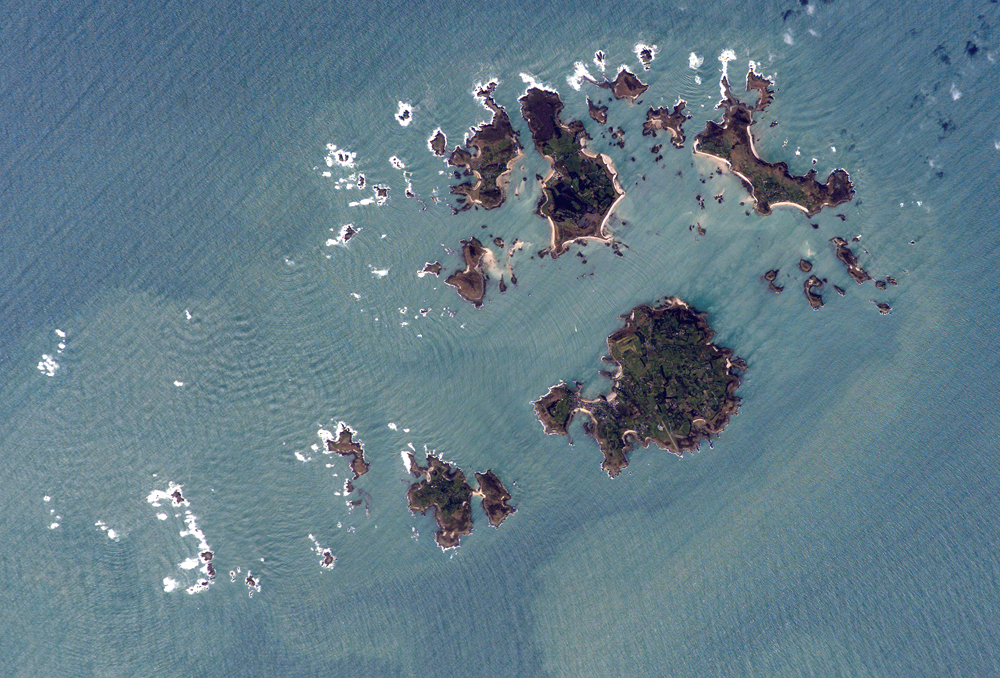
</div>]]></content><author><name>andreasrichardson</name></author><category term="blog" /><summary type="html"><![CDATA[Here's the deal: you can use them for free, for anything.]]></summary><media:thumbnail xmlns:media="http://search.yahoo.com/mrss/" url="https://atdr.uk/assets/images/chemistry-notes.jpeg" /><media:content medium="image" url="https://atdr.uk/assets/images/chemistry-notes.jpeg" xmlns:media="http://search.yahoo.com/mrss/" /></entry><entry><title type="html">Wavetacular</title><link href="https://atdr.uk/wavetacular/" rel="alternate" type="text/html" title="Wavetacular" /><published>2016-02-10T17:36:00+00:00</published><updated>2016-02-10T17:36:00+00:00</updated><id>https://atdr.uk/wavetacular</id><content type="html" xml:base="https://atdr.uk/wavetacular/"><![CDATA[<p>Browsing NASA’s gallery of <a href="http://eol.jsc.nasa.gov">Astronaut photography of Earth</a> today, I came across this gem of an image of the Scilly Isles.</p>

<p>Notice the diffraction of the waves around the small islands in the bottom left? Here’s a closer look:</p>

<figure>
    <img src="/assets/images/ISS014-E-16597.jpg" alt="The Isles of Scilly, seen from Space, showing wave diffraction pattern around islands" />
    <figcaption>
        Detail of the Isles of Scilly, seen from Space. (<cite><a href="https://eol.jsc.nasa.gov/Collections/EarthFromSpace/images.pl?photo=ISS014-E-16597">NASA Photo ID ISS014-E-16597</a></cite>)
    </figcaption>
</figure>

<p>Whilst it’s not exactly news to anyone that waves diffract, I thought it was incredibly cool to see such an impressive example of the phenomenon in nature.</p>

<p><a href="https://www.google.co.uk/#q=wave+diffraction+site:eol.jsc.nasa.gov">Doing some more digging</a>, it seems that <a href="http://eol.jsc.nasa.gov/SearchPhotos/metadata/Apollo7.htm">the crew of Apollo 7 took a similar image</a> (frame AS7-4-1607 of Magazine N) during their mission. Sadly, <a href="http://history.nasa.gov/ap07fj/a7images.htm#Magazine_N_">it doesn’t seem like any of the frames from that magazine have been digitised</a>. The <a href="https://www.google.co.uk/#q=%22AS7-4-1607%22">only other references</a> are in <a href="http://www.dtic.mil/dtic/tr/fulltext/u2/714001.pdf">a scientific paper</a> (§ 2.5 Space Photography) where the image is completely unintelligible and in <a href="https://archive.org/stream/nasa_techdoc_19710003091/19710003091#page/n63/mode/2up">a picture book digitised by the Internet Archive</a> which doesn’t seem to be <a href="https://archive.org/stream/nasa_techdoc_19710003091/19710003091#page/n64/mode/1up">at a high enough resolution</a> to see the pattern.</p>

<p>In any case, one diffraction pattern is exciting enough!</p>]]></content><author><name>andreasrichardson</name></author><category term="blog" /><summary type="html"><![CDATA[Who would have thought that it's possible to see wave diffraction patterns from space?]]></summary><media:thumbnail xmlns:media="http://search.yahoo.com/mrss/" url="https://atdr.uk/assets/images/ISS014-E-16597.jpg" /><media:content medium="image" url="https://atdr.uk/assets/images/ISS014-E-16597.jpg" xmlns:media="http://search.yahoo.com/mrss/" /></entry></feed>